
A Zonifinance Service
Fee management that keeps every school's books balanced.
Automated fee collection and tracking, built on the spreadsheets your office already uses. No new software to learn — just clearer numbers, updated every time a payment comes in.
120+
School Served
1500+
Customer Satisfied
8+ Years
Experience
99%
Accuracy
What's included
Everything your fee office needs, in one system
Built specifically for schools and colleges — not a generic invoicing tool bolted on afterward.
Excel-based entry
Staff keep entering fees the way they already do — no retraining, no new login.
Real-time dues tracking
Collected, due, and overdue balances update automatically as payments are entered.
Printable reports
Export any student’s ledger or the whole class’s totals, ready for a parent meeting.
Class-wide overview
See every class’s collection rate at a glance, not just one student at a time.
A Zonifinance Service
How This Fee Management System Works
Every school’s fee office already keeps a spreadsheet. This system builds directly on top of it — turning that sheet into a clear ledger that tells you, for any student or any class, exactly what’s owed, what’s paid, and what’s still pending.
The process
Five steps, from a blank sheet to a live summary
Each step feeds the next automatically — nothing needs to be recalculated by hand.
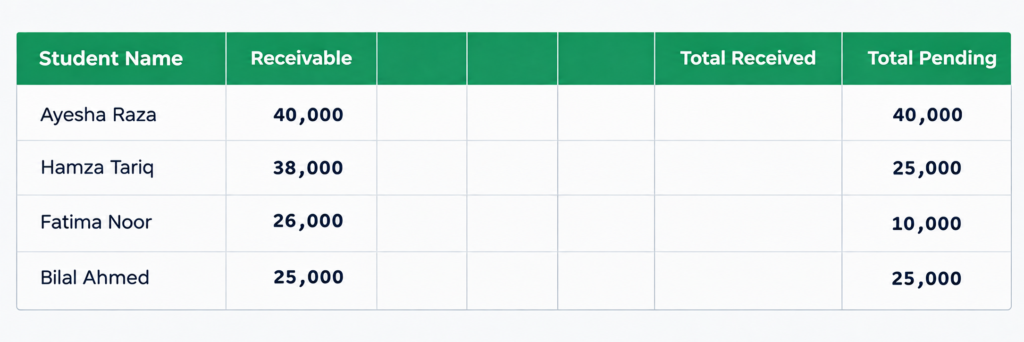
First, we create the Receivable
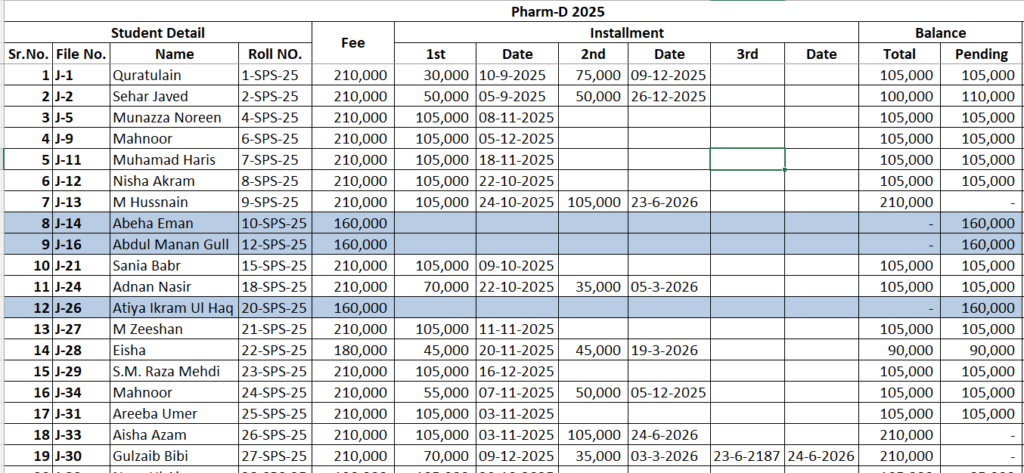
For every student, we set the total fee that’s due for the year — this is the Receivable. It’s the starting point: the number everything else gets measured against.
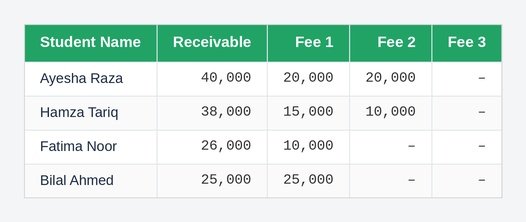
Then, every payment gets added against it
As fees come in — in full or in instalments — each payment is logged with a date and amount. Every entry adds up against that same student’s Receivable, so partial payments are never lost track of.
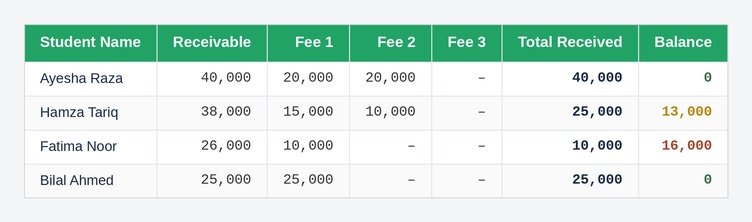
The balance updates on its own
Balance is simply Receivable minus everything received so far. There’s no manual subtraction — the moment a payment is entered, the balance for that student recalculates.
We do this program-wise
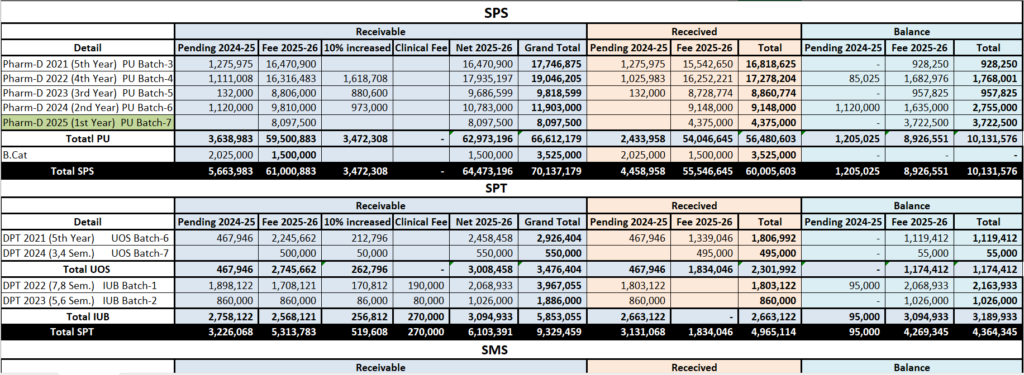
Students are added under their class or program — Grade 9, Grade 10, BSc Part I, and so on. Every program builds its own set of receivables and payments, side by side with every other program.
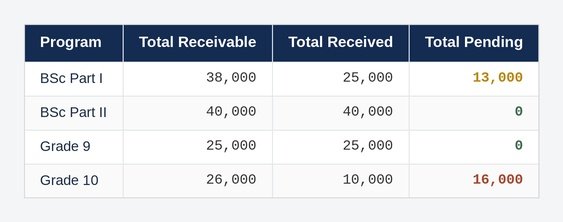
An overall summary comes together automatically
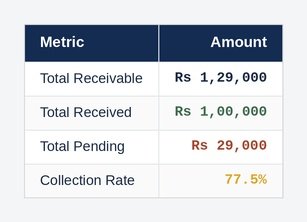
Once every student’s ledger is in place, program-wise and overall totals appear on their own — total Receivable, total Received, and total Pending, for one class or for the whole institution.
Not Just Tuition Fee
Other charges work exactly the same way
Anything a school collects can follow the same Receivable → Payment → Balance pattern.
Fee Detail By Students & Program
Fee Detail Overall Programs
Want this built for your school?
We’ll set this system up around your own students, programs, and fee structure — tuition, hostel, transport, whatever your institution collects. Once it’s built, you get direct access through a Google Sheet, so your office can see and update it anytime, from anywhere.
- Built around your own students and fee structure
- Delivered as a Google Sheet you fully own and control
- Set up and ready to use within a few days